
REST API
The REST API lets you manage product groups outside the app’s admin UI. Use it for catalog migrations, bulk imports from external sources, or syncing with a PIM. All endpoints are HTTPS, JSON, and authenticated with two headers.
Base URL
Section titled “Base URL”https://api.colorswatchesapp.com/v1Authentication
Section titled “Authentication”Every request needs two headers:
| Header | Value |
|---|---|
Shop-Domain | Your full Shopify domain, e.g. your-store.myshopify.com |
Authorization | Token token=YOUR_API_TOKEN |
Generate a token in the app under Settings > API credentials by clicking Generate new key. The previous token stops working immediately when you generate a new one.
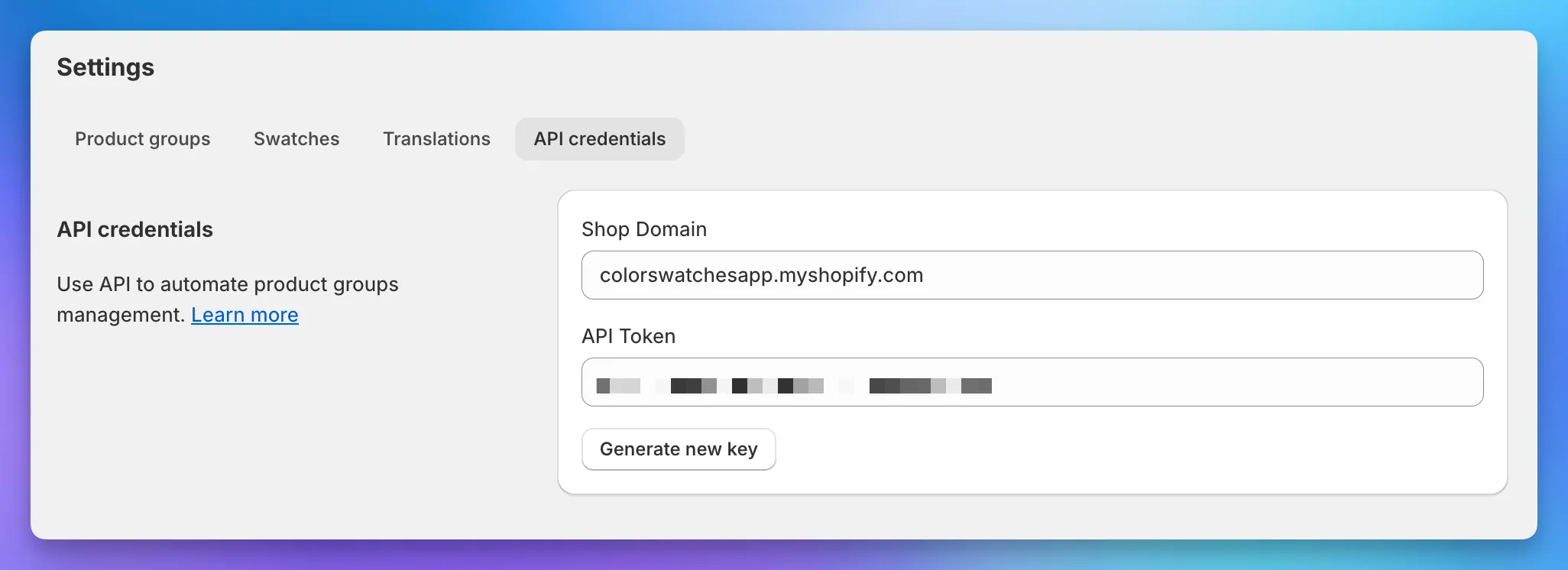
To follow along with the cURL examples below, export your credentials as environment variables:
export SHOP_DOMAIN=your-store.myshopify.comexport API_TOKEN=paste-your-token-hereRate limits
Section titled “Rate limits”Up to 60 requests per minute, per shop. Past that, requests return 429 Too Many Requests. There are no remaining-quota headers, so throttle client-side when running bulk imports.
Errors
Section titled “Errors”Error responses are JSON with an error field:
{ "error": "Bad credentials" }Common status codes:
| Code | Meaning |
|---|---|
401 | Missing or invalid Authorization token |
402 | Shop is not on the Premium plan |
404 | Resource not found (wrong group ID, missing shop) |
422 | Validation failed (e.g. missing required field, bad hex color) |
429 | Rate limit exceeded |
Pagination
Section titled “Pagination”List endpoints return paginated results with an RFC 5988 Link header containing URLs for the first, next, and last pages:
rel="first" -> /v1/groups.json?page=1rel="next" -> /v1/groups.json?page=2rel="last" -> /v1/groups.json?page=12Follow the next URL until it’s no longer present in the header.
Endpoints
Section titled “Endpoints”List groups
Section titled “List groups”GET /groups.json
curl -i \ -H "Shop-Domain: $SHOP_DOMAIN" \ -H "Authorization: Token token=$API_TOKEN" \ https://api.colorswatchesapp.com/v1/groups.jsonReturns an array of groups. Use -i to see the Link header for pagination.
Get a single group
Section titled “Get a single group”GET /groups/{GROUP_ID}.json
curl \ -H "Shop-Domain: $SHOP_DOMAIN" \ -H "Authorization: Token token=$API_TOKEN" \ https://api.colorswatchesapp.com/v1/groups/2.jsonCreate a group
Section titled “Create a group”POST /groups.json
curl \ -H "Shop-Domain: $SHOP_DOMAIN" \ -H "Authorization: Token token=$API_TOKEN" \ -H "Content-Type: application/json" \ -d '{ "title": "Backpack", "option_name": "Color", "products_attributes": [ { "shopify_id": 7453910991090, "swatch_name": "Black", "swatch_type": "one_color", "color_one": "#000000" } ] }' \ https://api.colorswatchesapp.com/v1/groups.jsonGroup fields:
| Field | Required | Description |
|---|---|---|
title | Yes | Group title, used internally |
option_name | No | Display name for the swatch group. Defaults to Color |
position | No | Order within the widget when a product belongs to several groups |
option_name_translations | No | Array of {locale, market_id, value} translations. See Translations |
products_attributes | No | Array of products. See fields below |
products_attributes fields:
| Field | Required | Description |
|---|---|---|
shopify_id | Yes | Shopify product ID. Entries without one are silently dropped |
swatch_name | Yes | Display name on the swatch |
swatch_type | Yes | One of one_color, two_colors, custom_image, product_image, image_with_text, pill |
color_one | Conditional | Hex color. Required when swatch_type is one_color or two_colors |
color_two | Conditional | Second hex color. Required when swatch_type is two_colors |
image_url | Conditional | Public URL to an image. Required when swatch_type is custom_image. The image_with_text and product_image types use the product’s own image instead |
position | No | Position within the swatch list |
swatch_name_translations | No | Array of {locale, market_id, value} translations. See Translations |
Update a group
Section titled “Update a group”PATCH /groups/{GROUP_ID}.json
curl -X PATCH \ -H "Shop-Domain: $SHOP_DOMAIN" \ -H "Authorization: Token token=$API_TOKEN" \ -H "Content-Type: application/json" \ -d '{ "title": "New Title", "option_name": "Color", "products_attributes": [ { "shopify_id": 7453911089394, "swatch_name": "White", "swatch_type": "one_color", "color_one": "#ffffff" } ] }' \ https://api.colorswatchesapp.com/v1/groups/9.jsonAccepts the same fields as Create a group. Each entry in products_attributes also supports two update-only fields: id (the existing product’s internal ID) and _destroy (set to "1" to remove that product).
products_attributes is additive: entries without id create new products, entries with id update existing ones, and entries with id plus "_destroy": "1" remove them. Products not mentioned in the array are left alone. To touch a single product without listing the rest, use the dedicated endpoints below.
{ "products_attributes": [ { "shopify_id": 7453910991090, "swatch_name": "Red", "swatch_type": "one_color", "color_one": "#ff0000" }, { "id": 42, "swatch_name": "Navy", "swatch_type": "one_color", "color_one": "#001f3f" }, { "id": 43, "_destroy": "1" } ]}Delete a group
Section titled “Delete a group”DELETE /groups/{GROUP_ID}.json
curl -X DELETE \ -H "Shop-Domain: $SHOP_DOMAIN" \ -H "Authorization: Token token=$API_TOKEN" \ https://api.colorswatchesapp.com/v1/groups/9.jsonRemoves the group and clears swatch metafields from its products.
Add a product to a group
Section titled “Add a product to a group”POST /shopify_products/{SHOPIFY_ID}/add_to_group.json
curl \ -H "Shop-Domain: $SHOP_DOMAIN" \ -H "Authorization: Token token=$API_TOKEN" \ -H "Content-Type: application/json" \ -d '{ "group": { "title": "Backpack" }, "swatch_name": "Black", "swatch_type": "one_color", "color_one": "#000000" }' \ https://api.colorswatchesapp.com/v1/shopify_products/7453911089394/add_to_group.jsonThe group is identified by title and created if it doesn’t exist. If the product already belongs to a different group, it gets moved into the new one. Empty source groups are deleted.
Top-level fields:
| Field | Required | Description |
|---|---|---|
group | Yes | Group object. See fields below |
swatch_name | Yes | Display name on the swatch |
swatch_type | Yes | One of one_color, two_colors, custom_image, product_image, image_with_text, pill |
color_one | Conditional | Hex color. Required when swatch_type is one_color or two_colors |
color_two | Conditional | Second hex color. Required when swatch_type is two_colors |
image_url | Conditional | Public URL to an image. Required when swatch_type is custom_image. The image_with_text and product_image types use the product’s own image instead |
position | No | Position within the swatch list |
swatch_name_translations | No | Array of {locale, market_id, value} translations. See Translations |
group fields:
| Field | Required | Description |
|---|---|---|
title | Yes | Group title. Identifies an existing group, or names a new one |
option_name | No | Display name for the swatch group. Defaults to Color |
option_name_translations | No | Array of {locale, market_id, value} translations. See Translations |
Remove a product from a group
Section titled “Remove a product from a group”POST /shopify_products/{SHOPIFY_ID}/remove_from_group.json
curl -X POST \ -H "Shop-Domain: $SHOP_DOMAIN" \ -H "Authorization: Token token=$API_TOKEN" \ https://api.colorswatchesapp.com/v1/shopify_products/7453911089394/remove_from_group.jsonIf the group ends up empty, it’s deleted too.
Translations
Section titled “Translations”To set translated values for option names or swatch names, include option_name_translations (on the group) or swatch_name_translations (on each product) when creating or updating:
{ "title": "Backpack", "option_name": "Color", "option_name_translations": [ { "locale": "fr", "value": "Couleur" }, { "locale": "de", "value": "Farbe" } ], "products_attributes": [ { "shopify_id": 7453910991090, "swatch_name": "Black", "swatch_name_translations": [ { "locale": "fr", "value": "Noir" }, { "locale": "de", "value": "Schwarz" } ], "swatch_type": "one_color", "color_one": "#000000" } ]}Each translation entry takes a locale (required) and an optional market_id for market-scoped overrides. Pass an empty array to clear translations for a field.