
Uninstall or cancel subscription
Decided to stop using Platmart Color Swatches? No problem. You have two options: cancel your subscription or uninstall the app. We also hold on to your data for 180 days, so if you change your mind, you can pick up where you left off.
How to cancel your subscription
Section titled “How to cancel your subscription”- Go to the Billing section in the left menu of the app.
- Click Actions > Cancel subscription.
- Confirm the cancellation when prompted.
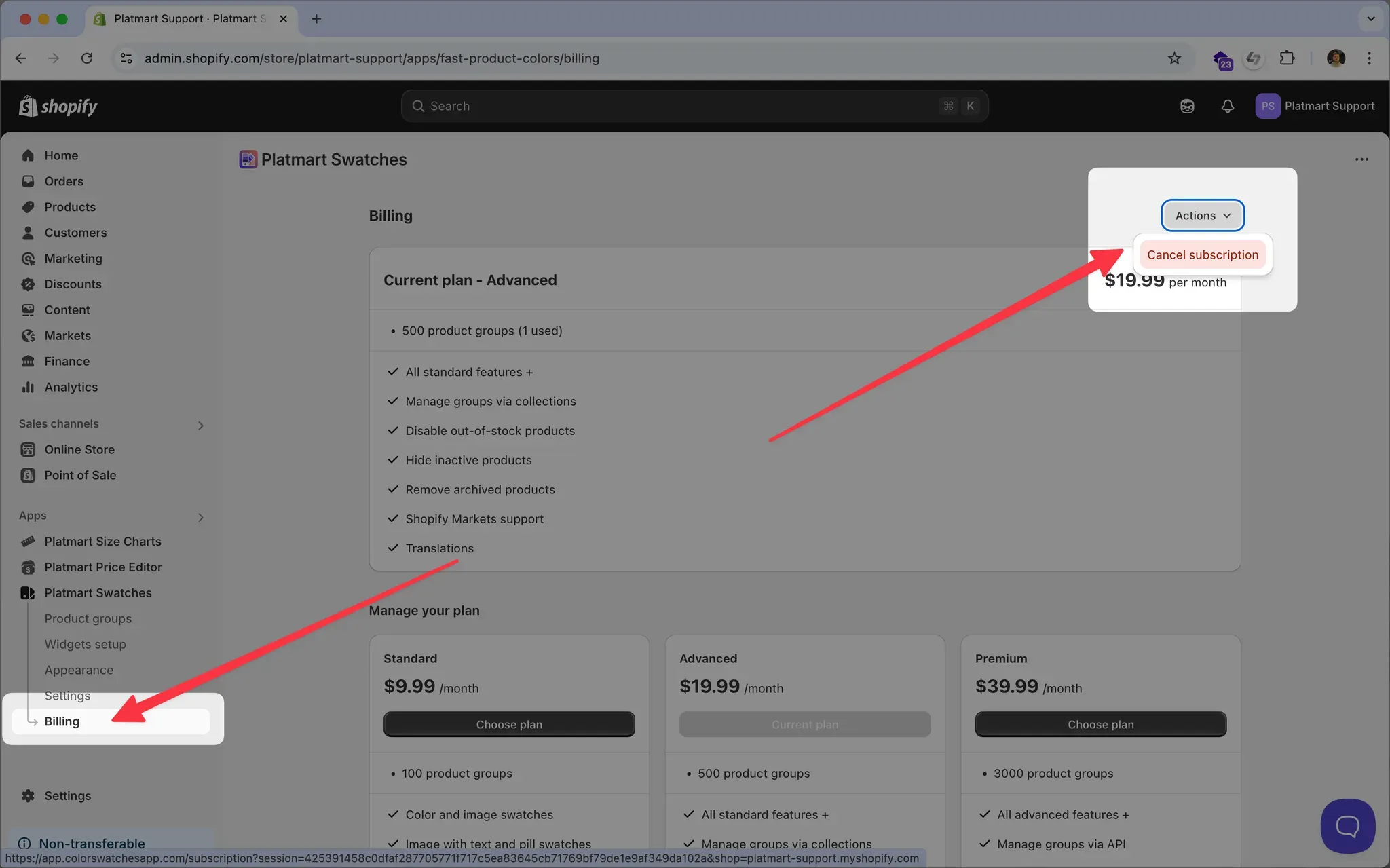
After cancellation:
- Your subscription will be canceled immediately.
- You can subscribe again at any time. Your data will be saved.
What gets removed from your storefront
Section titled “What gets removed from your storefront”When you cancel your subscription, the app stays installed but swatches stop showing on your storefront.
When you uninstall, the app cleans up after itself - the widgets stop loading and no leftover code stays in your theme. The one thing Shopify doesn’t let us clean up is metafields; see removing leftover metafields below.
What happens to your data
Section titled “What happens to your data”We don’t delete anything right away. For 180 days after you cancel or uninstall, we keep everything for you:
- All your product groups
- Every swatch you created
- Your automations
- All your settings - appearance, translations, integrations
Come back within 180 days and everything’s exactly where you left it. Nothing to reconfigure.
After 180 days, your data is permanently deleted. Reinstall after that and you’ll be starting fresh.
Removing leftover metafields
Section titled “Removing leftover metafields”Shopify revokes the app’s access the moment you uninstall, before it can delete the metafields it wrote. So swatch metafields - like pl_swatches.groups on your products - stay in your store after the app is gone. They’re harmless and nothing renders from them, unless your theme has custom code reading them.
Shopify doesn’t let us remove them from outside the store, so the cleanup needs a brief reinstall:
- Reinstall the app from the App Store listing.
- Email color-swatches@platmart.io and ask us to remove the metafields.
- We run the cleanup and let you know when it’s done.
- Uninstall the app again.
Got charged after uninstalling?
Section titled “Got charged after uninstalling?”This is almost always a Shopify billing-cycle thing rather than a mistake. Shopify bills every 30 days, not by the calendar month - see Plans and features for how billing works. If you uninstalled partway through your billing period, the charge that hits your account covers the days you already had the app installed. We know it feels surprising, but it’s working the way Shopify designed it.
If the charge still looks wrong to you - say, you uninstalled before the period started, or you’re seeing a charge for a stretch when the app wasn’t even installed - email us at color-swatches@platmart.io with:
- Your store URL
- The date you uninstalled
- The charge you’re questioning
We’ll take a look and process a refund if it’s warranted. Refunds usually show up on your card within 5-10 business days.