
Public metafields
Color Swatches writes swatch data to Shopify metafields under the pl_swatches namespace so you can render groups and variant colors yourself: in your theme, another app, or a headless storefront. The built-in widgets use the same data. No Color Swatches API token is required.
Product groups live on each product. Variant swatch colors live on the shop.
To render that data in a theme, see Reading swatch data in Liquid.
Product groups
Section titled “Product groups”By default, group data lives in private (app-scoped) metafields that only Color Swatches itself can see. Turn Enable public metafields on when you want to render group swatches with your own Liquid, query them from a headless storefront, or share them with a search, filter, or SEO app.
Enabling public metafields
Section titled “Enabling public metafields”- In the Color Swatches admin, go to Settings > Product groups, and find the General section.
- Check Enable public metafields and save.
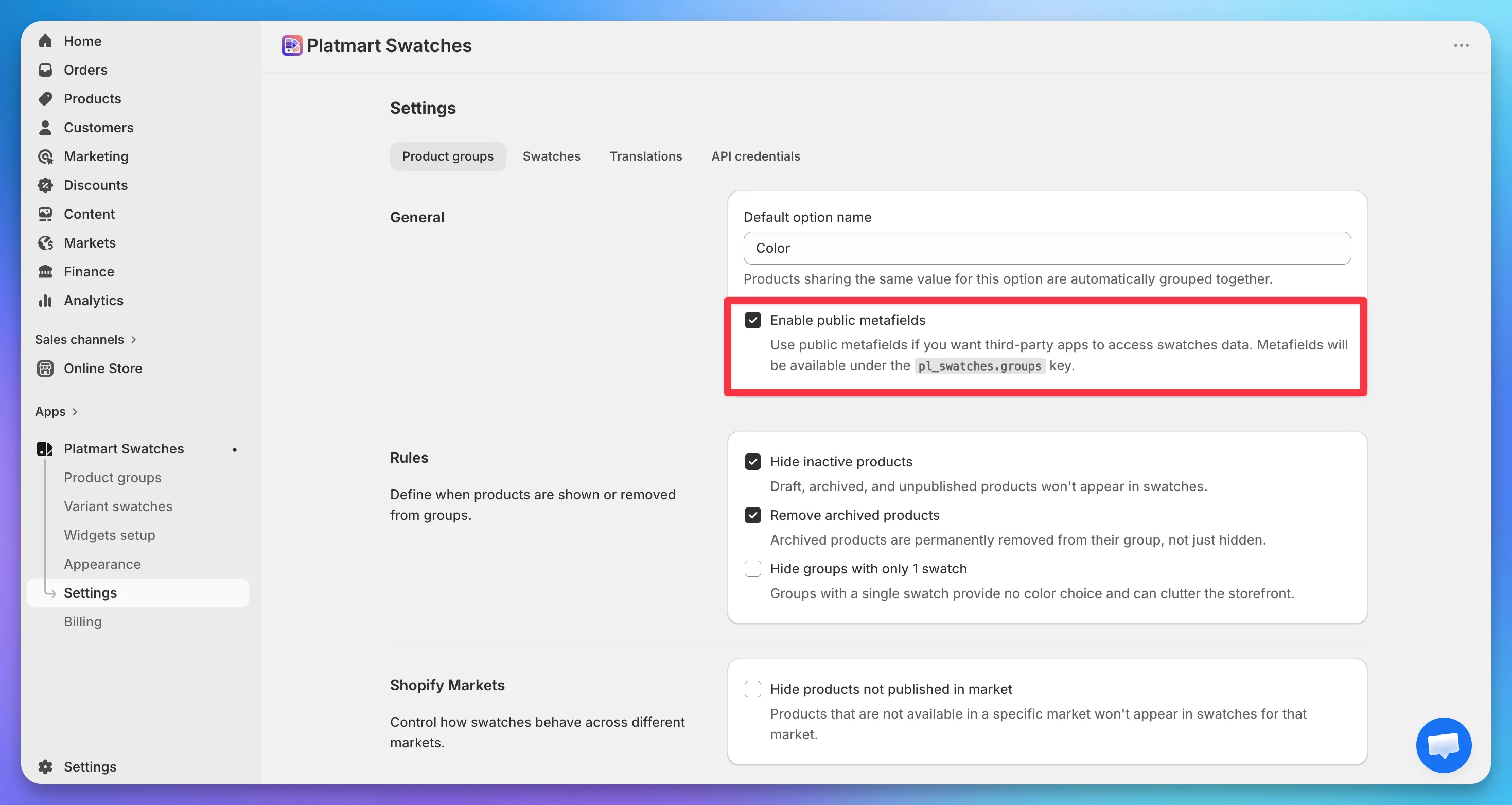
Saving triggers a full resync that writes every group to the public namespace. Small catalogs finish in under a minute; very large ones take longer.
You can disable the setting at any time. The public copies are removed, the private metafields stay in place, and the app keeps working without further changes.
Note that uninstalling the app does not remove the metafields - Shopify revokes the app’s access before it can clean up. See removing leftover metafields.
What gets written
Section titled “What gets written”The toggle controls a single product metafield:
- Namespace:
pl_swatches - Key:
groups - Type: JSON
- Owner: Product
In the Shopify admin you’ll find the definition under Settings > Custom data > Products, listed as “Platmart Swatches: Groups (public)”.
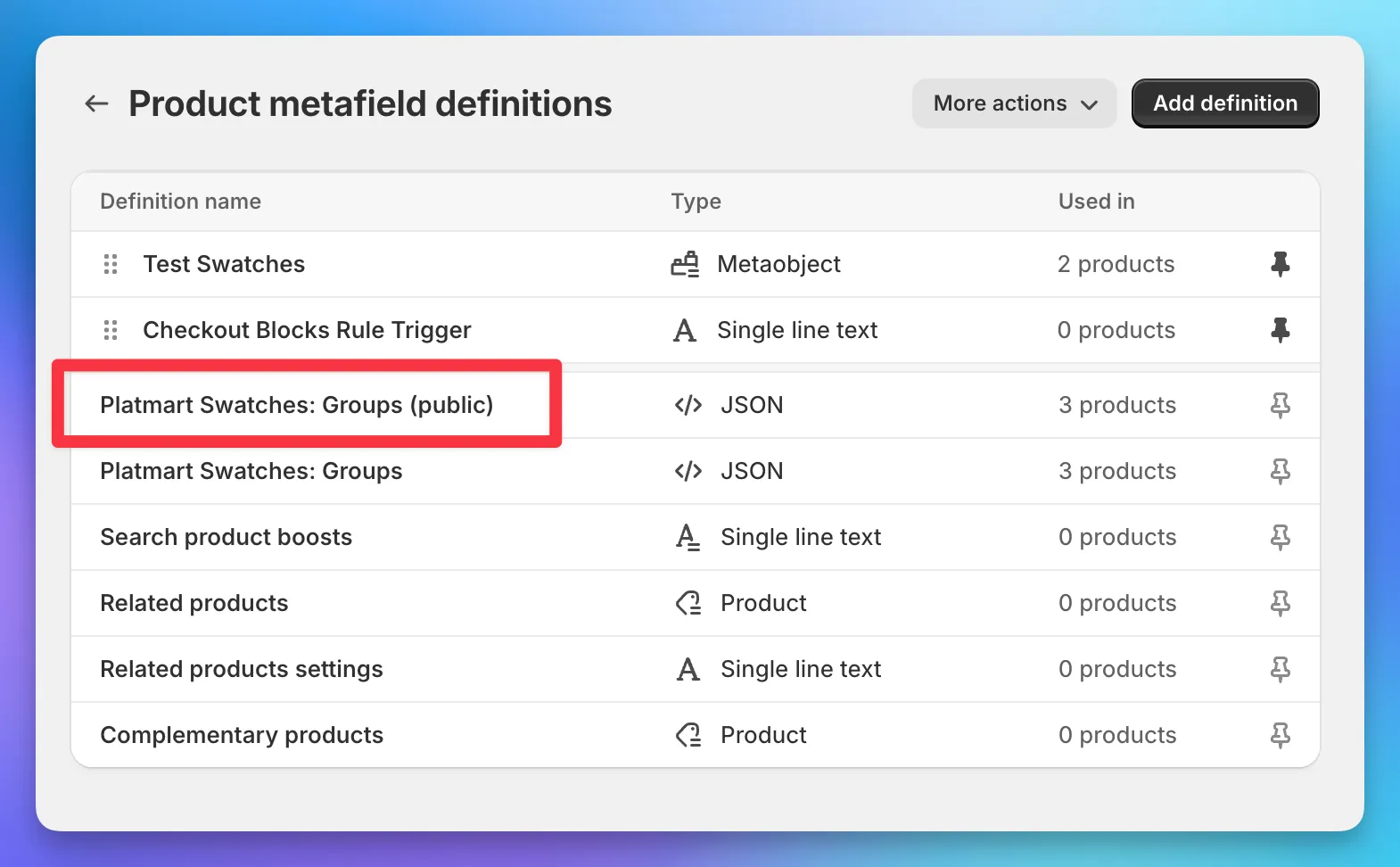
Only products that belong to at least one group get this metafield.
Payload structure
Section titled “Payload structure”The metafield value is always a JSON array, with one element per group the product belongs to. A product in a single-option group looks like this:
[ { "group_id": 12345, "option_name": "Color", "type": "colors", "display_for": "products_and_collections", "linked": false, "swatches": [ { "handle": "backpack-black", "name": "Black", "type": "one_color", "color_one": "#000000", "color_two": null, "image": null, "out_of_stock": false } ] }]If the product belongs to several groups, the array has multiple elements. Multi-option groups expand to one element per option slot, each with the same swatches shape.
Reading from the Shopify Storefront API
Section titled “Reading from the Shopify Storefront API”For headless storefronts, query the metafield field on a product through the GraphQL Storefront API:
query ProductSwatches($handle: String!) { product(handle: $handle) { id title swatchGroups: metafield(namespace: "pl_swatches", key: "groups") { value } }}The value is a JSON string. Parse it client-side to get the same payload you’d see in Liquid.
Reading from another app
Section titled “Reading from another app”Any Shopify app with the read_products access scope can read pl_swatches.groups like any other custom metafield. No special integration is needed.
Variant swatches
Section titled “Variant swatches”Variant swatch colors and images live on a shop metafield, not on each product. Color Swatches writes it for every shop that uses variant swatches.
What gets written
Section titled “What gets written”- Namespace:
pl_swatches - Key:
options - Type: JSON
- Owner: Shop
In Liquid: shop.metafields.pl_swatches.options
There is no definition under Settings > Custom data. Query it by namespace and key.
Payload structure
Section titled “Payload structure”The value is one JSON object for the whole shop, keyed by option name:
{ "Color": { "swatch_style": "color_or_image", "values": { "Black": { "type": "one_color", "color_one": "#000000", "color_two": null, "image": null }, "Navy/White": { "type": "two_colors", "color_one": "#001F3F", "color_two": "#FFFFFF", "image": null } }, "_lookup": { "Noir": "Black" } }, "Size": { "swatch_style": "button", "values": {}, "_lookup": {} }, "_name_lookup": { "color": "Color", "couleur": "Color", "size": "Size" }}Keys that start with _ are lookups, not options. Skip them when you iterate.
Option fields
Section titled “Option fields”| Field | What it is |
|---|---|
swatch_style | How the option should render: color_or_image, button, or variant_image |
values | Map of option value name to swatch visuals. Filled only when swatch_style is color_or_image |
_lookup | Translated or alternate value names pointing at the canonical value name |
sections | Optional. Labeled groups of values when variant sections are on |
Value fields (color_or_image only)
Section titled “Value fields (color_or_image only)”| Field | What it is |
|---|---|
type | one_color, two_colors, or custom_image |
color_one | Hex color (when type is one_color or two_colors) |
color_two | Second hex color (when type is two_colors) |
image | Image URL (when type is custom_image) |
Swatch styles
Section titled “Swatch styles”color_or_image- Use thevaluesmap for colors and custom images.button-valuesis empty. Render Shopify’s option values as text pills.variant_image-valuesis empty. Use each variant’s image from Shopify.
Joining to variants
Section titled “Joining to variants”This metafield does not include variant IDs, prices, or inventory. Shopify already has those. Fetch the product’s options and variants, then look up each name in the dictionary.
- Lowercase the Shopify option name and resolve it through
_name_lookup(covers translations). - On that option, take the Shopify value name. Use
values[name]if it exists; otherwise resolve through_lookup. - Render from
swatch_styleand the matched value object.
The dictionary is shop-wide. Ignore entries that are not on the current product. For markets and unpublished variants, trust the product payload Shopify returns, not the full dictionary.
Reading from the Shopify Admin API
Section titled “Reading from the Shopify Admin API”Any app that can query the Shop object can read this metafield. No Color Swatches API token is required.
query VariantSwatches { shop { variantSwatches: metafield(namespace: "pl_swatches", key: "options") { value } }}The value is a JSON string. Parse it, then join it to the product:
query ProductOptions($id: ID!) { product(id: $id) { options { name optionValues { name } } variants(first: 2048) { nodes { id selectedOptions { name value } image { url } } } }}The Shopify Storefront API cannot read this metafield: there is no shop metafield definition with storefront access. Use Admin GraphQL or Liquid.