To price a Black Friday sale on Shopify, decide three things first: how much discount your margin allows, which products get which discount, and whether discount codes can stack on sale prices. Then set the sale up at least a week early, schedule the start and end, test on a few products, and don’t touch prices until it’s over.
Black Friday is November 27, 2026, and Cyber Monday is November 30. This BFCM checklist comes from Platmart Bulk Price Editor, the price app I build. I went through last Black Friday in the app, 1,351 sales across 181 stores, to see how stores set up their sales and which problems they ran into most often. The checklist below is how to prepare so you don’t hit them.
Most stores build their Black Friday sales at the last minute. Between November 20 and December 2, 2025, 181 stores ran 1,351 sales in Platmart Bulk Price Editor:
A rushed sale is where mistakes happen. The decisions in Part 1 take one afternoon, and they are the ones you can’t change once the sale is running.
Not every product needs a Black Friday discount. Decide what the sale is for, because the goal sets the depth:
If a percentage off hurts the brand, offer value another way: a bundle, a gift with purchase, free shipping over a threshold, or early access for subscribers.
Start from your margin, not from what competitors advertise. Last year, the typical sale in Platmart Bulk Price Editor took 25% off, and half of all sales landed between 20% and 35% off.
Every discount comes straight out of your profit per order. To make the same gross profit, you need to sell this many times more units:
| Your margin | 10% off | 20% off | 25% off | 30% off |
|---|---|---|---|---|
| 40% | 1.3x | 2x | 2.7x | 4x |
| 50% | 1.25x | 1.7x | 2x | 2.5x |
| 60% | 1.2x | 1.5x | 1.7x | 2x |
The formula: margin ÷ (margin - discount). At a 50% margin, 25% off halves your profit per unit, so you need 2x the sales to break even. At a 40% margin, 30% off needs 4x.
Black Friday ads and December returns come out of the same margin. And a discount only pays on orders you wouldn’t have had anyway: 25% off a bestseller that sells at full price all November is a gift to people who were buying regardless.
Group products by how much discount they can absorb. Most stores use two to four levels; 45% of stores running a Black Friday sale in the app last year used more than one, for example:
Put each level in its own collection, or tag the products, so it’s easier to manage sales later.
Shopify gives you three ways to take money off, and customers see them in different places:
| Sale price with compare-at | Automatic discount | Discount code | |
|---|---|---|---|
| Where customers see it | Product and collection pages: crossed-out old price and sale badge | Cart and checkout | Checkout, after typing the code |
| Shows in product feeds (Google Shopping, Meta) | Yes, as a sale price | No | No |
| Starts and ends on a schedule | Not in Shopify admin; with an app | Yes | Yes |
| Stacks with codes | Yes, unless you block it (below) | Only if set to combine | Only if set to combine |
For the main discount, change the price and set the compare-at price: that is what the product page, sale badges, feeds, and price trackers show. Keep automatic discounts for cart-level offers and codes for people you want to reward specifically.
Not to make the discount look bigger. Plenty of stores raise prices in November so the Black Friday percentage looks better, and regulators treat that as a fake discount. It’s risky:
If your prices are too low for your costs, raise them now, weeks before the sale, as a permanent change. A price that’s been in place for weeks is a real “was” price. In Platmart Bulk Price Editor, use tasks for permanent price changes like price increases.
Yes. Shopify applies codes to the current price, so a 15% welcome code on a product that’s already 30% off gives roughly 40% off, often below what you planned.
You have three options:
One more trap: a free shipping threshold set for full prices. A $60 cart at 30% off is $42, under a $50 threshold, so a sale order pays shipping. Lower the threshold for the weekend, or say so on the banner.
Late? If you’re reading this after November 20, do Part 1 today and the test sale next. Everything else compresses into a day.
The problems merchants brought to support most often last Black Friday, and the item in this part that prevents each:
| Problem | Why it happens | How to avoid it |
|---|---|---|
| Some products don’t get the new discount | They’re still in another sale, so the app leaves them out to avoid discounting them twice | Keep each product in one sale, and end one sale before the next one starts |
| No discount in other countries | The market has its own fixed prices, so a sale on your main prices doesn’t reach it | Run a market sale for each currency, or reset the market’s fixed prices so it follows your main prices |
| No crossed-out price | Compare-at price not set to the old price, or the products were already marked down | Use Set to old price (discount). Clean up old markdowns first |
| Sale prices change back during the day | An inventory sync, ERP, or another price app writes its own prices | Pause those syncs during the sale, or turn on hourly re-apply |
| A scheduled sale can’t start | The collection it uses was deleted or replaced after the sale was scheduled | Don’t delete or rename collections used by scheduled sales |
Run a test sale first. Put two or three slow-selling products on sale now, check them on your storefront (including markets), then click Disable and confirm the prices came back. It’s the best test to be sure all sales will start as expected.
Create one sale per discount level. Decrease the price by your percentage, and set Compare at price to Set to old price (discount), so your theme shows the crossed-out price and a sale badge. Pick a price ending in the Rounding card now, because it is locked once the sale starts. The full walkthrough is in how to schedule a Shopify sale.
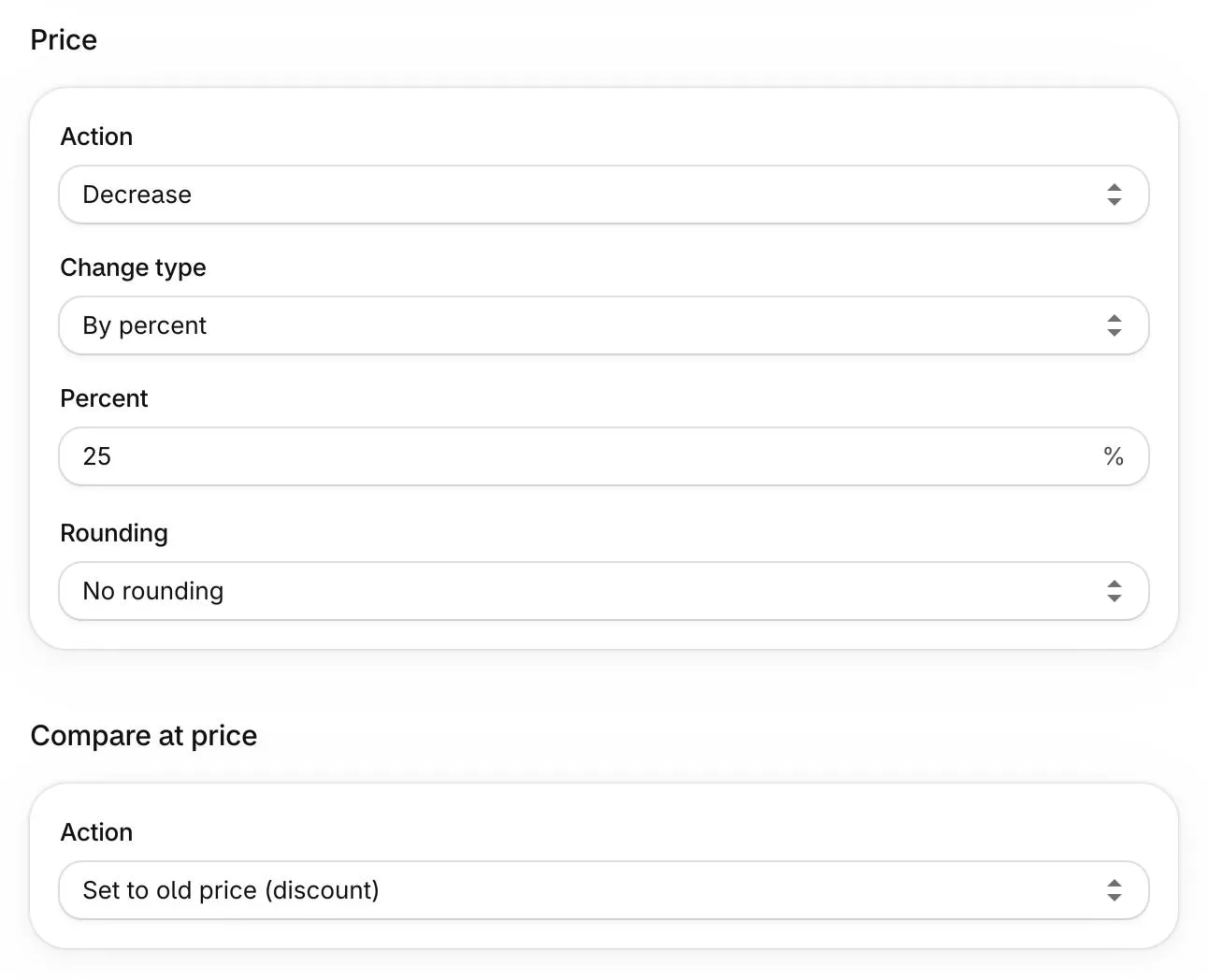
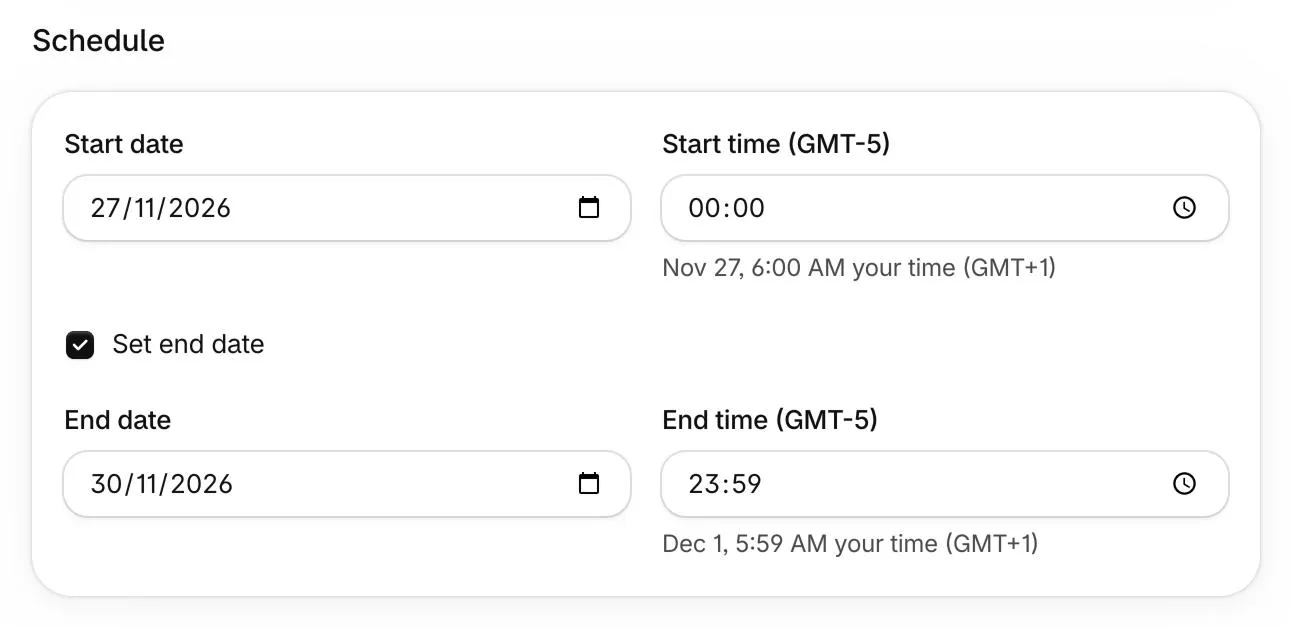
Set the start time 30-60 minutes before you announce the sale. Shopify limits how fast apps can change prices, about 400 products a minute on the Basic and Grow plans, and every store’s sale starts at the same minute.
Turn on Set end date. Without it, the discount stays until someone turns it off by hand. End the sale right after Cyber Monday, or create a separate sale for Cyber Monday with its own discount.
Selling in several countries? A market with its own fixed prices needs a market sale per currency. If a market should simply follow your main prices, reset its fixed prices with a task before the sale instead, and roll the task back once the sale has ended.
Start from your margin, not from what competitors advertise. Last year the typical Black Friday sale in Platmart Bulk Price Editor took 25% off, and half of all sales were between 20% and 35%. At a 50% margin, 25% off halves your profit per unit, so you need to sell twice as many units to break even. Use the deepest discounts to clear stock and smaller ones on bestsellers.
A sale price, with the old price in Compare-at price. It shows on product and collection pages as a crossed-out price with a sale badge, and product feeds pick it up. Automatic discounts only show in the cart and at checkout. Keep them for cart-level offers, like free shipping over a threshold.
At least a week before Black Friday (November 27, 2026), and schedule the start. That gives you time to test on a few products, fix your selection, decide how discount codes work, and get your theme, banners, emails, and shipping cutoff dates ready.
Not for product prices. Shopify can schedule automatic discounts, but they only show in the cart and at checkout, not on product and collection pages. To actually change the product price and compare-at price on a schedule, you need an app like Platmart Bulk Price Editor, or Shopify Launchpad if you're on Plus.
Platmart Bulk Price Editor restores exactly the prices and compare-at prices it recorded before the sale started, at the end date you set. Anything you edited by hand during the sale gets overwritten by that restore, so make permanent price changes after the sale, not during.
In Platmart Bulk Price Editor, click Check changes in the sale's Details to add them. The app can also check your collection every hour and add new products automatically.
Yes. Create one sale per discount level, for example 20% off new arrivals and 40% off last season, with different products in each. Keep every product in one sale only, so each gets exactly the discount you planned.
Platmart Bulk Price Editor schedules your Black Friday sales, shows the old price crossed out, and restores every original price when each sale ends. It works with Shopify Markets, and you can block discount codes on sale items. The Free plan includes 2 sales a month, up to 100 products each. Paid plans start at $14.99 a month.
Get Platmart Bulk Price Editor →